
You sit down to compare two tour booking systems. You open FareHarbor’s site, hunt for a pricing page, and there isn’t one. Just a “Book a demo” button. You try Peek Pro. Same thing. A form, a sales call, no number. Two of the biggest names in tour software, and neither one will tell you what it costs until a rep has you on a call.
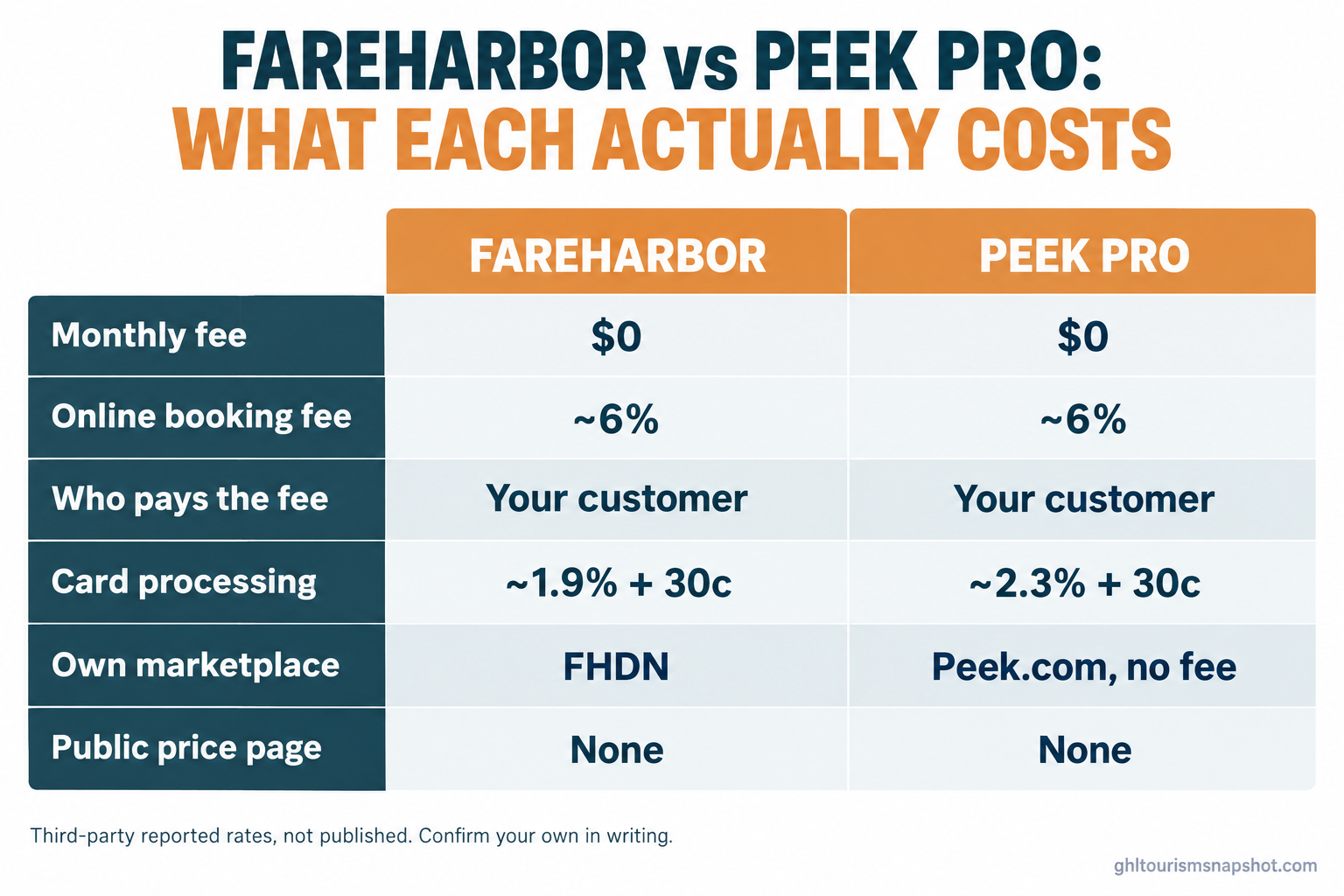
Here is the short version. FareHarbor and Peek Pro both run a demo-first, quote-only sales process, so your rate is a negotiation, not a published price. Both are widely reported to charge no monthly subscription and instead add a booking fee of around 6 percent to each online booking, usually passed to your customer at checkout, with card processing on top (roughly 1.9 percent plus 30 cents on FareHarbor and about 2.3 percent plus 30 cents on Peek Pro, per third-party guides). Neither vendor publishes these numbers, so treat every figure here as a planning number and get your own rate in writing. This teardown covers what each actually costs, who carries the fee, where the quote hides money, and which is right for a solo guide, a mid-size shop, and a high-ticket operator.
Why won’t either one show you a price?
Start with the thing that annoys every operator who shops these tools: there is no price page. Not in the footer, not behind a “contact sales” tier. Just a demo form.
That is a choice. When a company hides its price, the price is a negotiation: your rate depends on your volume, your ticket size, how many other quotes you hold, and whether the rep thinks you will walk. A small operator who takes the first number pays more than a bigger shop that pushed back.
It helps to know who you are dealing with. FareHarbor was acquired by Booking Holdings, parent of Booking.com, Priceline, Agoda and Kayak, back in April 2018, and runs inside that group. (Booking Holdings, Skift) Peek is independent, venture-backed, and based in San Francisco. (CB Insights) Both make money the same way: a slice of every booking. You cannot compare two numbers you cannot see, so the job in a demo is not to be sold. It is to walk out with the same numbers from each vendor, in writing, so you can finally line them up.
FareHarbor vs Peek Pro at a glance
Every figure below is third-party reported, not from either vendor’s own page. Use it as a demo baseline, then confirm your real rate in writing.
| What you are comparing | FareHarbor | Peek Pro |
|---|---|---|
| Monthly subscription | None reported | None on the base model; a ~$199/mo tier is reported but unconfirmed |
| Online booking fee | ~6% direct (reported) | ~6% online (reported, some guides say up to 8%) |
| Who pays the fee | Usually your customer | Usually your customer |
| OTA / API bookings | ~2% (reported) | Varies by channel |
| Own marketplace | FareHarbor Distribution Network (FHDN) | Peek.com, reportedly 0% booking fee |
| Card processing | ~1.9% + $0.30 (reported) | ~2.3% + $0.30 (reported) |
| Contract | No minimum reported | Quote-dependent; onboarding fees reported |
| Owner | Booking Holdings | Independent, VC-backed |
Sources for each row appear below. For the full six-tool version with the transparent alternatives, see what tour booking software actually costs in 2026.
The booking fee, and who actually pays it
The reported model for both is the same shape: no monthly bill, and a booking fee of about 6 percent on each online booking. Multiple 2026 guides put FareHarbor at roughly 6 percent on direct bookings (CaptainBook, Bokun), and Peek Pro guides land in the same place, around 6 percent online (Bokun, TrekkSoft).
Here is the part operators miss: that fee is usually passed to the customer. On a $120 tour a reported 6 percent fee adds about $7.20, so the traveler sees roughly $127 at checkout and you keep your full $120. (Bokun) It looks free because the line item lands on someone else, but it raises your effective price against a cleaner checkout next door. That is the catch of the “$0 a month” pitch: the cost shows up as abandonment, not an invoice.
The fee is not flat, either. FareHarbor reportedly drops to around 2 percent on OTA and API bookings (Bokun), and Peek reportedly charges no booking fee on its own Peek.com marketplace (Bokun). That is not generosity, as the distribution section below explains.
Card processing, the fee under the fee
Every platform also charges you to run the card, and this lands on you no matter what. FareHarbor’s merchant processing is reported at about 1.9 percent plus 30 cents per ticket (Bokun); Peek Pro’s is reported closer to 2.3 percent plus 30 cents (Bokun). Stack that on the booking fee and the all-in cost of one $120 direct booking is roughly $9.78 on FareHarbor and $10.26 on Peek Pro, the 6 percent riding on your customer and the processing coming out of your pocket. So in a demo, ask for the booking fee and the processing rate as two separate numbers. A rep who quotes you “all in” is doing you no favors, because you cannot compare it to anything.
Contracts, setup, and your customer list
A cheap-looking tool is expensive if you can never leave it, and a “free” one can still cost up front. FareHarbor is reported to have no setup fee, no contract minimum, and hands-on onboarding included (Bokun). Peek Pro is murkier: some 2026 guides report onboarding and implementation fees other platforms do not, one estimating the hundreds to a few thousand dollars (Roverd), which I could not confirm against a second source. Either way, get any setup fee, contract term, and early-termination fee in dollars and in writing before you sign.
The bigger lock-in is your customer list. The real value of a booking system over years is the contact records it builds: every traveler’s name, email, phone, and booking history. If exporting that list is slow, partial, or quietly discouraged, you are not really free to switch. Ask both the blunt version: “If I cancel, can I export my full customer list with emails and phone numbers, in a standard file, at no charge?” That answer separates a tool you rent from a trap you are stuck in. Your booking tool should capture the sale; your own system should own the relationship, so the follow-up, reviews, and repeat bookings are yours no matter which widget you run this year. That is the whole argument for owning your direct-booking engine.
Distribution: FHDN vs the Peek marketplace
Both companies run their own distribution, and both want your inventory in it. This is a feature and a trap at the same time.
FareHarbor has the FareHarbor Distribution Network (FHDN), placing your tours on partner sites and, through its Booking Holdings parent, a large travel audience. Peek has Peek.com, where bookings reportedly carry no booking fee to you (Bokun). Free distribution sounds like a gift. The catch is the same one the big OTAs run: when a booking comes through the marketplace, the platform owns that customer relationship, not you. You got the sale, but not the clean contact details, the follow-up, or the repeat booking, the same trade we broke down in how Viator takes a fifth of every booking and owns your customer. A fee of zero is not zero if the price is the customer. Use the marketplace to fill last-minute and off-peak seats you would not have filled otherwise, but do not let it become your main channel, or you are renting customers you could own.
Three operators, three real costs
A percentage fee hits differently depending on what you sell and how much. Here is the same reported 6 percent model run across three real shapes of business. Hold the rate steady and watch what changes.
The solo operator: a $55 kayak seat or escape-room slot, about 1,500 bookings a year. A reported 6 percent fee is about $3.30 a booking on the customer, roughly $4,950 a year on travelers’ totals. The fee is small and there is no monthly bill while you are tiny, so this is the band where FareHarbor and Peek Pro make the most sense, as long as you watch abandonment.
The mid-size shop: a $120 food, brewery, or ATV tour, about 4,000 bookings a year. Now the 6 percent is about $7.20 a booking, roughly $28,800 a year on your customers, plus processing on you. This is where the quiet math turns, so run the number against a transparent operator-pays tool near $99 a month plus 3 percent, which at this volume can come out cheaper and keeps your checkout clean.
The high-ticket operator: a $300 private charter, about 2,000 bookings a year. A 6 percent fee is about $18 a booking, roughly $36,000 a year on your customers, and that $18 is a real conversion drag right as a traveler commits $300. No high-ticket operator should run a passed-through 6 percent fee without hard-negotiating it first, and this is exactly where a quote-based vendor has room.
The higher your ticket and volume, the more both the surcharge and the negotiation matter. Multiply your ticket by your yearly bookings by the fee before any demo, and that number tells you how hard to bargain.
Where each platform breaks
Every tool has a failure mode. Know them before you sign, because this is the stuff the demo will not volunteer.
Both break on the hidden price itself. When the rate is a negotiation, the operator with the weakest hand pays the most. A solo owner who takes the first quote subsidizes the chain that walked in with three competing numbers. If you do not negotiate, you lose by default.
FareHarbor breaks on the gravity of the ecosystem. It is sticky by design: good onboarding, a deep system, and once your whole operation lives inside it with its parent company’s distribution wired in, leaving feels like open-heart surgery. Fine if the fee is fair, a slow bleed if it is not and you never re-check.
Peek Pro breaks on the unknowns in the quote. The reported onboarding fees, the conflicting accounts of a monthly tier, and the channel-dependent fee mean you can sign without really knowing your all-in cost. Pin every number in writing, or you find out after migrating.
Both break on the repeat customer and the high ticket. The fee has no loyalty discount: the guest booking her second trip costs the same as a cold stranger off Google. And a surcharge invisible on a $45 seat becomes an $18 flinch on a $300 booking. You never see it on an invoice; you see it as the traveler who reached the last screen and closed the tab.
Steal this: the demo script that gets a number
Walk into both demos with the same questions and make the rep answer in writing. That turns two sales calls into two quotes you can line up.
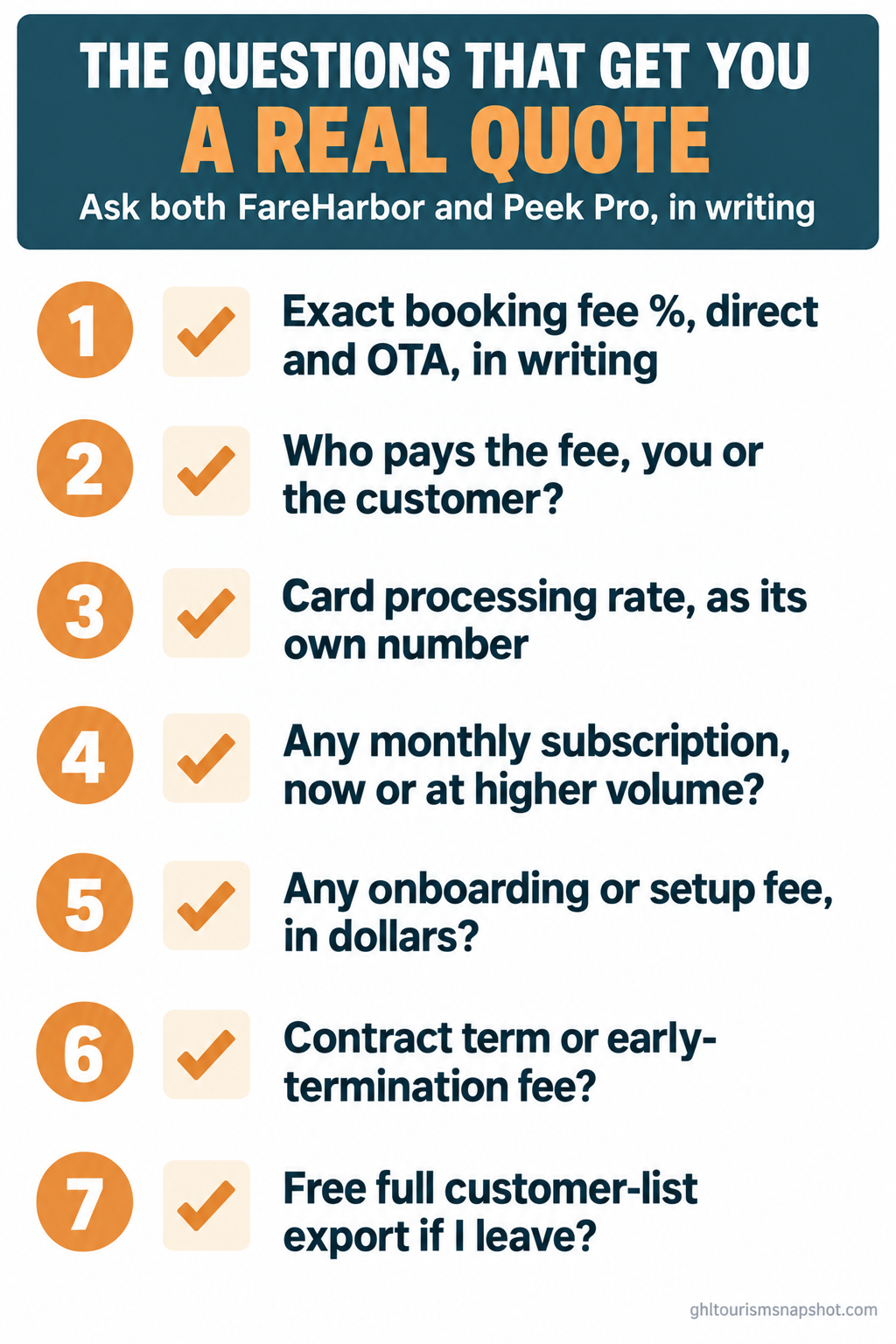
If a rep will not put question one in writing, that is your answer about the whole relationship. And if you run a guest-pays tool and keep it, be honest with the traveler so the fee is not a last-second ambush. One plain line near your booking button does the job:
It is true, it is plain, and it moves the surprise from the final screen to before the traveler has invested effort, where it does the least damage.
Which one is right for you?
After the demos, it usually comes down to a few honest reads.
FareHarbor is the safer pick if you want deep software and real onboarding and your tickets are low to mid. You are trading a passed-through fee and real lock-in for a mature tool a busy owner can actually run. Just re-check your fee every renewal, because the stickiness is the whole point.
Peek Pro can win on flexibility and marketplace reach, especially if a chunk of your volume comes through Peek.com. But it carries the most unknowns in the quote, so it only wins if you pin every number down first and make them compete.
Neither is right if your tickets are high or your volume is large and you have not negotiated. At that size the transparent operator-pays tools in FareHarbor vs Checkfront vs Rezdy and the Bokun free plan breakdown often come out cheaper, and the shortlist in FareHarbor alternatives for small tour operators is a good start for a small shop. Whatever you pick, the biggest win is not the booking tool. It is sending fewer seats through any per-booking fee at all, by owning your repeat business instead of renting it.
Objections, answered straight
“The fee is on my customer, so why should I care which one I pick?” Because travelers compare totals, not base prices, and the fee shows up at the most fragile moment in the sale. It raises your effective price and nudges abandonment, worst of all on a high ticket, so it is your problem even when it is your customer’s line item.
“FareHarbor’s onboarding sounds great and it is free. Isn’t that the obvious choice?” The onboarding is a real strength, and for a small, low-ticket operator it may well be the right call. Just do not confuse “no monthly bill” with “cheap.” Run your annual fee number and get it in writing. Plenty of bigger shops find the fee adds up to more than a transparent subscription.
“I am not technical. Can I even run one of these?” Yes. Both are built for operators and include onboarding. The harder part is not the software. It is the marketing that fills the seats and brings guests back, which no booking widget does for you.
FAQ
FareHarbor vs Peek Pro: the questions operators ask
How much does FareHarbor cost?
FareHarbor does not publish a price. The reported model is no monthly subscription and a booking fee of about 6 percent on direct online bookings, usually passed to your customer, dropping to around 2 percent on OTA and API bookings, plus card processing near 1.9 percent plus 30 cents. None of it is published, so confirm your rate in writing before you sign.
How much does Peek Pro cost?
Peek Pro is also quote-only. Guides report a booking fee of roughly 6 percent on online bookings, usually charged to the customer, no fee on bookings through Peek's own Peek.com marketplace, and card processing near 2.3 percent plus 30 cents. Some sources also report onboarding fees, so ask for every number in dollars.
Why don't FareHarbor and Peek Pro show their prices?
Both run a demo-first, quote-based sales process, so your rate is a negotiation, not a published number. Your price depends on your volume, ticket size, and how hard you push. Walk in with competing quotes and get your rate in writing, then re-check it at renewal.
Who pays the booking fee, me or my customer?
On both tools the fee is usually added to the customer at checkout, which is how they advertise no monthly cost. That is not free to you: it raises your effective price and can nudge abandonment, especially on a high-ticket booking. Confirm in the demo whether you can change who absorbs it.
Can I avoid the booking fee on repeat customers?
Not inside either booking tool, because both charge per booking with no loyalty discount. The fix is to capture every guest's contact details and run automated follow-up, review, and win-back messages so your best travelers rebook direct instead of through a fresh fee-bearing booking. That is what the Tourism Snapshot sets up.
Back to that moment at your desk, two tabs open, neither showing a price. The missing number is not an accident. It is the business model: keep the rate a negotiation, keep the fee on the customer, keep your inventory flowing through their distribution. For a lot of operators one of these two tools is still the right call. But refuse to be the one who takes the first quote. Walk into both demos with the same seven questions, get every number in writing, and bring the guests who already love you back direct, where no per-booking fee ever touches them again.